


 3
3
If you received Easynews access with your Eweka subscription, this guide will help you activate the service and answer any questions you may have about getting started.
What is Easynews?
Easynews is a long-standing Usenet provider delivering fast, secure access to years of stored articles. They are most notable for offering the first web-based Usenet search tool. This feature can be used in any browser, on any web-enabled device, to explore newsgroups and access articles — no installation or setup required. This all-in-one browser-based search tool removes the need for installing extra Usenet software, helping you find articles quickly and accurately no matter when they were shared.
How to Activate Your Free Easynews Account
Step 1. In your Eweka welcome email, scroll down to the bottom and click on the link in the section labeled “Activate Your Easynews Account.” This will take you to your Eweka account dashboard, which you can also visit by clicking here: https://www.eweka.nl/en/myeweka
Step 2. From your Eweka account dashboard, click on the “Get Easynews Free” link on the left side of the page (if you have not already been redirected there). Enter the email address associated with your Eweka account in the box at the top of the page and click on ‘Submit’.
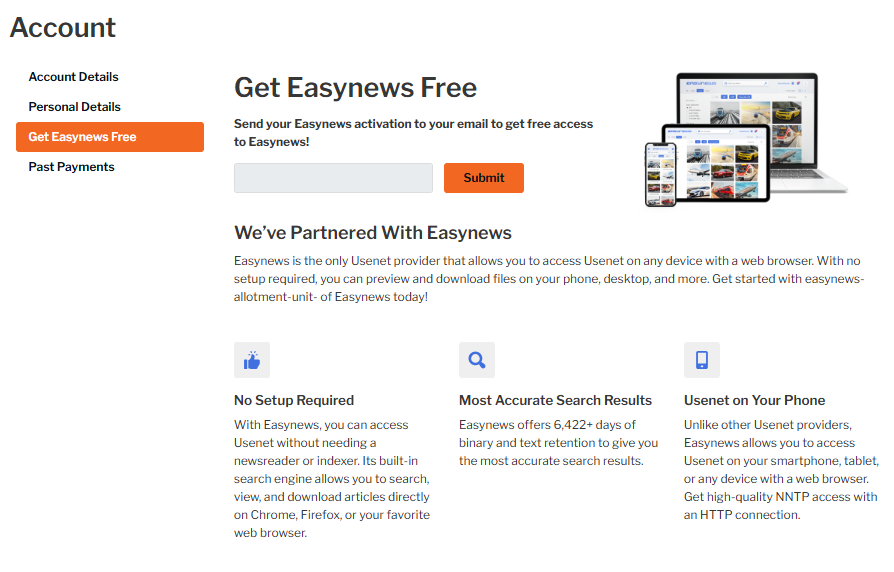
Step 3. Check your inbox for an email from Eweka, which contains the information you’ll need to get started with Easynews, then scroll to the end of the email and select the link labeled “click here”.
If you have any questions, please contact Eweka support.

