


Usenet Wire provides fast, direct Usenet access through Eweka’s network. If you’re not seeing the speeds you expect, try the following tips to troubleshoot and improve your setup.
Adjust the Number of Connections
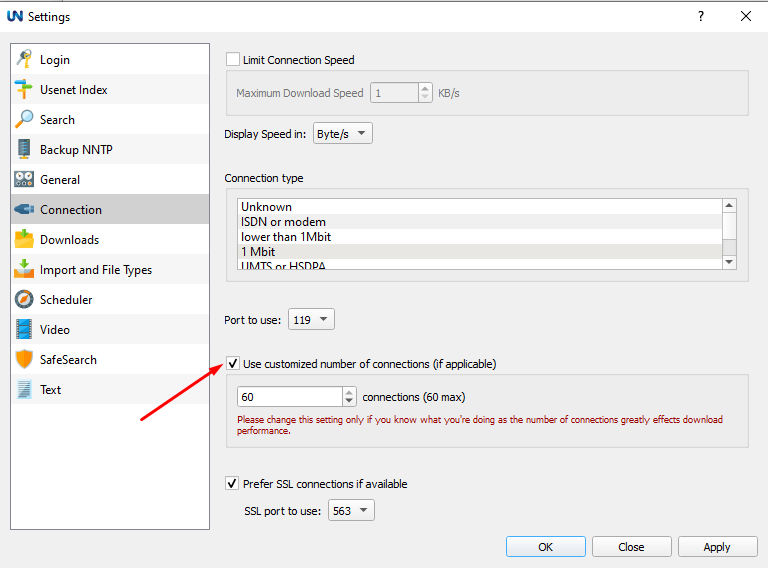
Review how many simultaneous connections are configured in Usenet Wire. Eweka supports up to 50 connections, but using the maximum does not always provide the best performance.
Fewer connections may improve stability, especially on less powerful devices. Adjust the connection count in steps of 5, comparing transfer speeds after each change to find the best balance for your system.
Experiment with Different Ports
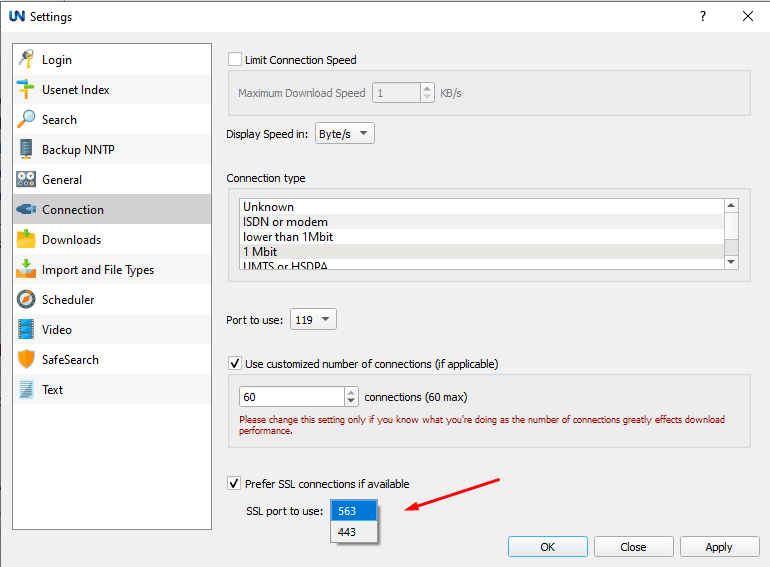
Eweka supports SSL connections on ports 563 and 443. Depending on how your Internet provider handles traffic, switching ports may improve performance.
Go to Options > Settings > Connection, check “Prefer SSL connections if available,” and test each port in the dropdown. Keep the port that provides the most consistent speeds.
Check Your Server Address
Use news.eweka.nl as your Eweka server address. Network routing can affect performance, especially when connecting from outside the Netherlands.
If speeds remain slow after trying the other steps in this guide, contact Eweka support for help checking your connection and whether an alternate server address would be appropriate.
Improve Network Stability
For more reliable performance, use an Ethernet connection instead of Wi-Fi whenever possible. Wireless interference or a weak signal can reduce transfer speeds.
Restarting your modem and router may also help resolve temporary connection issues.
Pause Competing Internet Activity
When multiple devices on your network are accessing high-bandwidth services, it may impact Usenet speeds. Try limiting concurrent usage while Usenet Wire is active to reduce congestion.

